
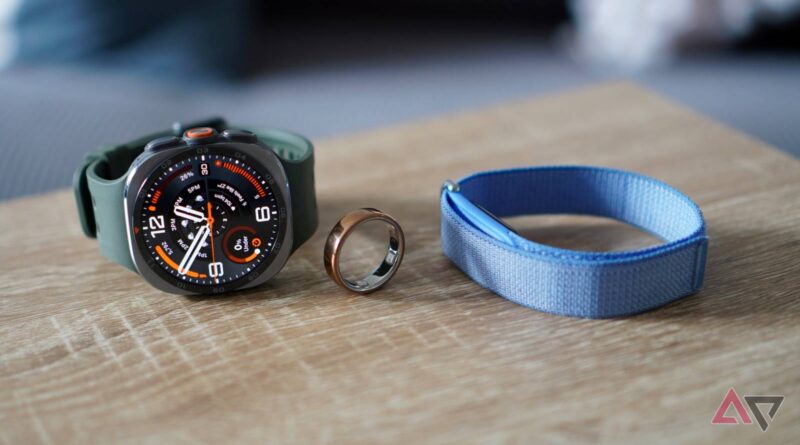
I tracked sleep with Galaxy Watch Ultra 2, Fitbit Air, and Oura Ring 5. This is the one I’d buy
Sleep tracking is a major feature on all wearables, and the data collected helps you know if you’re set for strenuous exercise or better off taking a quiet rest day.
I’ve worn the new Samsung Galaxy Watch Ultra 2, the Google Fitbit Air, and the Oura Ring 5 to track my sleep, and to find out which one is the best choice for sleepers.
Obvious hardware differences
Wrist or finger?

Both the Samsung Galaxy Watch Ultra 2 and the Fitbit Air are worn on your wrist, while the Oura Ring 5 is on your finger. There are major differences between their sizes and weights.
The Galaxy Watch Ultra 2’s substantial 47mm case size and considerable 94-gram weight mean it’s borderline for tracking sleep comfortably.
I noticed it on my wrist during the day, and it was the first thing I thought about when I woke up.

The new Marine Band is soft and flexible, but despite the air channel underneath, it gets quite hot.
The Fitbit Air is completely different. The soft fabric band is secured using a hook-and-loop system, making it highly adjustable.
It gets less hot and sweaty than the Galaxy Watch Ultra 2’s rubber strap, and at 11 grams, it’s barely noticeable on your wrist during the day and overnight.

Finally, the Oura Ring 5 is a smart ring, and at just 3 grams, is the lightest and most unobtrusive of the three.
Getting the size right is essential to avoid any comfort problems, but provided you do, and after you adjust to wearing a ring, it’s the ideal way to track sleep if you prefer not to feel like you’re wearing a device to do so.
Tracking sleep
Very different apps

The Galaxy Watch Ultra 2 uses the recently updated Samsung Health app. Google’s Health app is required for the Fitbit Air, and it’s Oura’s own app for the Oura Ring.
Samsung Health’s sleep data is presented on a single page. It shows a sleep score, graphs for sleep stages, blood oxygen levels, heart rate, and skin temperature.
I like the cute icons linked to your sleep score, the comparison with averages in your age group, and its achievement awards. It’s clear, logical, and easy to interpret.

Google’s Health app makes finding your sleep data harder by spreading key data across the Sleep and Health tabs.
However, I like the way it shows trend data along with your current score, and the graphs are bold and instantly readable.
The Oura Ring app has a friendlier style and places less importance on complex graphs. Instead, it uses line graphs to show outliers or areas of concern. All the data is there, but you have to scroll to find it.
It also highlights key metrics including resting heart rate, along with easily understood metrics like sleep debt and sleep efficiency.
Oura prioritizes sleep tracking, and it shows in the well-presented app.
Did the data match?
Some discrepancies

I left all three devices to track my sleep automatically.
The Oura Ring 5 and Galaxy Watch Ultra 2 recorded essentially the same sleep time, which was in line with my own estimate, while the Fitbit Air recorded a 30-minute longer sleep time.
The sleep score across all three was the same at 88. Google Health recorded more time spent in the Light sleep stage, and less in REM and Deep sleep. The Oura and Galaxy Health apps mostly agreed on the stages.
Understanding time spent in the different sleep stages is an important aspect of sleep tracking, so discrepancies may make it harder to spot issues.

Google Health also consistently records a higher resting heart rate than with the Oura Ring 5 and the Galaxy Watch Ultra. Blood oxygen levels, heart rate variability, and respiratory rates are almost identical between them.
The other major anomaly was in Samsung Health, which recorded 40 minutes of time awake during the night, where the other two barely recorded any awake time.
It appears Samsung Health logs slight movement as time spent awake, and is also very quick to assume I’m napping when I’m just watching a movie.
Thanks for making me feel lazy, Samsung Health.
I’m using the app and Galaxy Watch Ultra 2 ahead of release, and a software update may arrive to refine the algorithm.
These issues aside, the three largely agree on how I slept, and returning the same sleep score means, despite the slight differences, the data doesn’t affect the final result.
What about the advice?
Is it helpful, or just fluff?

Looking at numbers and graphs is one thing, but what does each app tell you about improving your sleep?
None are medical devices, so any advice will be wellness-based, but that doesn’t have to mean it’s unhelpful.
I like the AI Health Coach in Google Health’s summary, which includes references to exercise from the day before, advice on when to exercise based on weather conditions, and whether your sleep data suggests it’s better to skip your workout.
I asked the Health Coach how to reduce my overnight respiratory rate (which it records as higher than the other wearables), and whether it was worth doing.
The response was interesting and detailed, showing my results were average, and advised me to focus on reducing stress, increasing cardio fitness, and promoting a consistent sleep schedule.

Oura Advisor, the AI inside the Oura app, works in a similar way. It offers some prompts, such as asking what has been affecting my sleep score lately.
In its answers, Advisor digs into data trends to tell you what is working well and what has negatively affected the sleep score.
I asked Oura Advisor the same question about respiratory rate, and the answer was enlightening.
It looked at my personal trends and integrated other data points to give a detailed and interesting response.
It felt more personal and relevant compared to the Google AI Health Coach’s answer, but this may be due to the length of time I’ve worn both devices.
Google Health has two months of my data to use, while the Oura app has five years of data.

Finally, there’s Samsung Health. There’s no AI chatbot, which puts it behind the Oura Ring 5 and Fitbit Air.
Instead, it summarizes your sleep and other activities on the main page, giving suggestions on what you should aim to do during the day and targets to meet.
The sleep coaching feature, which requires seven consecutive nights of sleep tracking to activate, helps put you on track for better sleep if the app recognizes a problem.
The Oura Ring 5’s app presents sleep data in the friendliest, clearest, and most easily navigated way.
The Oura Advisor’s advice is relatable and personal, and the question prompts help newcomers understand how to interact with it. It’s proof there’s genuine value in long-term wear too.
Google’s AI Health Coach is a close second, but the emphasis on its conversational style lessens the impact of its advice.
Samsung Health is less intelligent, with a more classic fitness tracking approach to data.
The Galaxy Watch Ultra 2’s screen is a key advantage over the other two, as all the data seen in the Samsung Health app is also available on your wrist.
How much does each device cost?
Subscription isn’t always optional

Before we get to the conclusion, the costs involved with each wearable are important to understand.
The Oura Ring 5 starts at $400 and requires a $6-per-month subscription. If you don’t pay the subscription, all you see are daily scores.
The Google Fitbit Air is $100, and to access the AI Health Coach, you pay the $10-per-month Fitbit Premium subscription.
Finally, the Samsung Galaxy Watch Ultra 2 is $700, and the Samsung Health app is completely free to use. Samsung Health is also compatible with the $380 Galaxy Watch 9 and the $400 Samsung Galaxy Ring.
Which wearable is the best sleep tracker?

Based on comfort, app design, data presentation, and in-app advice, the Oura Ring 5 is the best wearable for sleep tracking, when compared to the Fitbit Air and Samsung Galaxy Watch Ultra 2.
The Fitbit Air comes a close second, but the data inconsistencies make me trust it less, despite the AI Health Coach’s strengths. It’s also the far superior exercise tracker, which isn’t the Oura Ring 5’s strength.


8.5/10
- Battery Life
-
7 days
- Health sensors
-
Optical heart rate, 3-axis accelerometer, temperature sensor
- Dimensions
-
35 x 17 x 8.3mm (Module)
- Water Resistance
-
50 meters
Samsung Health’s features, despite the app’s redesign, are limited. If you’re only interested in data, don’t care about chatting with an AI to get feedback and advice, and are happy to draw your own conclusions, it’s a strong option.

- RAM
-
2GB
- Storage
-
64GB
- Bluetooth
-
v6.0
- Weight
-
61.5g
- IP Rating
-
IP69K
The Galaxy Watch Ultra 2’s hardware isn’t ideal for sleep tracking, but there’s always the Galaxy Watch 9 as an alternative, and the screen is helpful to see your data in the morning without looking at the app.
All are great choices, but the Oura Ring 5 edges ahead to be our choice for those most interested in sleep tracking.